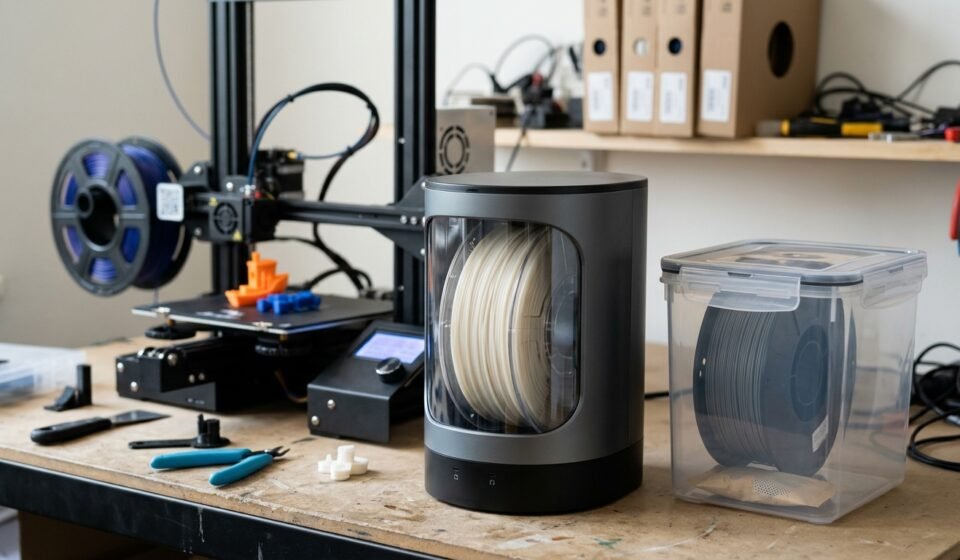

A filament dryer for PLA can help improve print consistency when your filament has absorbed moisture, but not every PLA user needs to buy one. If your prints look good and you store filament properly in sealed bags or airtight containers with desiccant, you may be able to print PLA successfully without a dedicated dryer.
However, if your filament makes popping sounds during extrusion, produces unusual bubbles, or consistently gives you rough surfaces despite correct printer settings, moisture could be part of the problem.
In this guide, you’ll learn when drying PLA is worthwhile, which temperature and drying time to start with, how to store filament afterward, and what to look for when choosing a dryer.
Do You Need a Filament Dryer for PLA?
The answer depends on your printing conditions, storage habits, and print quality.
PLA is generally easier to manage than highly moisture-sensitive materials such as nylon, but it can still absorb moisture from the surrounding air. Whether that moisture becomes a practical problem depends on the filament formulation, exposure conditions, and how it is stored.
A dedicated dryer is worth considering if:
- Your PLA has been exposed to humid air for an extended period.
- You hear popping or crackling during printing.
- You see bubbles or rough surfaces that may be related to moisture.
- Drying a spool has previously improved your print results.
- You print frequently and want a convenient way to maintain filament condition.
You may not need one immediately if:
- You print PLA occasionally and your prints are consistently good.
- You keep unused spools sealed with effective desiccant.
- Your filament is newly opened and prints normally.
- You have no recurring signs that suggest a moisture problem.
The practical recommendation: Start with good storage and diagnose printing problems before purchasing equipment. If moisture-related problems recur, a controlled filament dryer can be a useful investment.
What Temperature Should You Use to Dry PLA?
A common starting point for drying standard PLA is approximately 40–45°C (104–113°F) for 4–6 hours. Some filament manufacturers and dryers recommend settings closer to 50°C, so check the instructions for your specific filament and equipment before starting.
| Drying parameter | Practical guidance |
|---|---|
| Starting temperature | 40–45°C |
| Typical duration | 4–6 hours |
| Higher setting | Only if the filament manufacturer and dryer instructions permit it |
| Main precaution | Avoid overheating the filament or deforming its spool |
| After drying | Store the filament in a sealed, dry environment |
These are general starting guidelines, not a universal prescription. The moisture level, spool size, airflow, temperature accuracy, and PLA formulation can affect the result.
Why shouldn’t you use excessive heat?
PLA can soften when heated near its glass-transition range. If the filament becomes soft enough to deform, adjacent strands may stick together or the spool may become difficult to unwind. A temperature that appears acceptable on a control panel may also differ from the actual temperature around the spool.
For safer results:
- Check the filament manufacturer’s drying instructions.
- Verify that your dryer can maintain the selected temperature.
- Make sure the spool can tolerate the drying conditions.
- Start with a conservative setting within the recommended range.
- Inspect the spool and filament before returning them to the printer.
Do not assume that a higher temperature will always dry PLA faster without introducing other problems.
How Long Does PLA Take to Dry?
For many standard PLA spools, a drying cycle of around four to six hours is a reasonable starting point. The exact duration depends on how much moisture the filament has absorbed and how effectively the equipment circulates warm air.
A spool that has been stored properly may need no additional drying. A spool that has spent a long time in humid conditions may require more attention.
Use the following approach:
- Newly opened spool: Follow the manufacturer’s instructions. If it prints normally, additional drying may not be necessary.
- Previously sealed spool: Inspect the storage conditions and print quality before deciding to dry it.
- Spool with suspected moisture problems: Use a suitable dryer and the recommended temperature/time combination.
- Spool that still prints poorly after drying: Investigate other causes instead of repeatedly extending the drying cycle without a clear reason.
A timer alone cannot confirm that filament is completely dry. If your dryer includes a humidity display, treat it as a useful indicator rather than a direct measurement of the moisture content inside the filament.
How to Tell If Your PLA Filament Is Wet

Moisture is one possible cause of printing defects, but the same symptoms can result from incorrect printer settings, a worn nozzle, poor retraction tuning, or other mechanical problems.
Watch for these signs:
1. Popping or Crackling During Printing
If you hear repeated popping or crackling as the filament passes through the hot end, moisture may be vaporizing during extrusion. This is a useful clue, especially if it occurs alongside other print-quality problems.
2. Bubbles or an Uneven Surface
Moisture can contribute to bubbles, rough textures, or irregular extrusion. Inspect the surface of the print and compare it with a model that previously printed well using the same settings.
3. More Stringing Than Usual
Fine strands between printed features can be associated with wet filament, but they can also result from nozzle temperature, retraction, travel settings, and material characteristics. Do not assume that stringing alone proves moisture is the cause.
4. Inconsistent Extrusion
If lines appear irregular or the surface becomes unexpectedly rough, moisture may be one factor. Check the nozzle, filament path, and extrusion settings before making a final diagnosis.
5. A Change After Poor Storage
A spool that was left exposed to humid air or stored in a container without effective moisture control deserves closer inspection if printing problems appear afterward.
Best approach: If several signs occur together, try a controlled drying cycle and print a small test model. Compare the results with the same filament before drying, keeping other printer settings as consistent as possible.
Best Ways to Dry PLA Filament
There are several ways to dry filament, but they differ in temperature control, convenience, and risk.
Option 1: Use a Dedicated Filament Dryer
A purpose-built dryer is often the most convenient option for regular 3D printing. It provides a controlled heating chamber, and many models include a timer and adjustable temperature settings.
Benefits include:
- Easier control over drying temperature and duration.
- A chamber designed to accommodate filament spools.
- Convenient repeatable drying cycles.
- The possibility of feeding filament directly to a printer on models designed for that use.
Before purchasing, check the maximum spool dimensions, supported spool materials, temperature accuracy, and whether the dryer supports your intended printing setup.
A more expensive model is not automatically better for PLA. If you mainly print one spool at a time, a simple, well-controlled dryer may be sufficient.
Option 2: Use a Food Dehydrator
A food dehydrator can be a practical alternative if it accommodates your spool and maintains the required low temperature.
Check the following before using one:
- The spool fits without touching the heating element.
- The temperature can be set and monitored accurately.
- Air can circulate around the spool.
- The appliance can operate safely for the required duration.
Some dehydrators require tray removal or modification to accommodate a spool. Avoid unsafe modifications that interfere with airflow or electrical components.
If you dedicate an appliance to filament drying, do not assume it remains suitable for food preparation afterward. Follow the appliance manufacturer’s guidance and consider contamination risks.
Option 3: Use a Household Oven With Caution
A household oven is generally less convenient for drying PLA because its actual temperature may fluctuate or overshoot the setting. Some ovens are not designed to maintain very low temperatures accurately.
If you are considering this method, use it only if the appliance can safely and reliably maintain the filament manufacturer’s recommended range. An independent thermometer can help verify the temperature, but it does not eliminate the risk of sudden overshoot.
Never place a spool in an oven and assume that a low displayed setting guarantees safe conditions. If you cannot control the temperature reliably, choose a dedicated dryer or suitable dehydrator instead.
Filament Dryer vs. Dry Box: What’s the Difference?
A filament dryer and a dry box serve different purposes.
| Feature | Filament dryer | Dry box |
|---|---|---|
| Main purpose | Remove absorbed moisture using controlled heat | Reduce moisture exposure during storage |
| Heating | Usually yes | Usually no |
| Desiccant | May be included or used separately | Commonly used |
| Best use | Treating filament that may already be damp | Keeping stored or in-use filament dry |
| Can it replace the other? | Not necessarily | Not if the filament needs active drying |
A dry box with fresh desiccant can help preserve filament condition, but it generally does not remove significant moisture from a spool as effectively as a suitable heated drying process.
Likewise, drying a spool once does not prevent it from absorbing moisture again. The most useful routine is to dry when necessary and store filament correctly afterward.
How to Keep PLA Dry After Drying
Proper storage helps preserve the results of a drying cycle.
Use Airtight Containers or Sealed Bags
Place cooled filament in an airtight container or a suitable resealable bag. Remove unnecessary air where practical, but prioritize a reliable seal over simply squeezing a bag.
Add Desiccant
Silica gel or another appropriate desiccant helps absorb moisture inside the container. Follow the desiccant manufacturer’s instructions for regeneration or replacement.
Monitor Storage Conditions
A small digital hygrometer can help you monitor the relative humidity inside a storage container. It does not measure the moisture inside the filament itself, but it can help identify whether the storage environment is staying dry.
Avoid Leaving Spools Exposed Unnecessarily
Return unused filament to sealed storage when practical. This is particularly helpful if your workspace is humid or you use a spool slowly.
Store Filament Away From Heat and Sunlight
Keep PLA in a cool, dry location away from direct sunlight and excessive heat. Avoid placing it near heaters, hot electronics, or other sources that could soften the material.
How to Choose a Filament Dryer for PLA
If you have decided to buy a dryer, focus on features that match your actual printing habits.
Temperature Control
Choose a unit that can reliably maintain the temperature recommended for your PLA. A wide temperature range is not valuable if the device cannot control its low-temperature settings accurately.
Spool Compatibility
Check the maximum spool diameter, width, and weight. Make sure the spool fits freely and that the filament can unwind without obstruction.
Timer and Automatic Shutoff
A timer makes it easier to repeat drying cycles. Automatic shutoff can be useful, but it does not replace correct temperature selection or safe operation.
Humidity Display
A humidity display can provide additional information about the air inside the chamber. Remember that chamber humidity is not the same as a direct measurement of moisture remaining in the filament.
Single-Spool or Multi-Spool Capacity
For occasional PLA printing, a single-spool unit may be enough. If you frequently prepare several spools or work with multiple materials, additional capacity may be more convenient.
Direct Printing From the Dryer
Some dryers are designed to feed filament to a printer while the spool remains inside the chamber. If this matters to you, check the feed path, spool compatibility, and manufacturer’s operating instructions.
Temperature Range for Other Materials
If you plan to print PETG, TPU, nylon, or other materials later, check their specific drying requirements before buying. A dryer suitable for PLA may not reach the temperature required for a different filament.
Common Mistakes When Drying PLA
Avoid these mistakes to protect both your filament and your equipment.
Using too much heat: Higher temperatures can soften PLA or deform a spool.
Assuming every print defect is caused by moisture: Stringing, rough surfaces, and extrusion problems have multiple possible causes.
Confusing drying with storage: A dry box helps prevent moisture uptake; it is not necessarily a substitute for active drying.
Using an inaccurate oven setting: Low-temperature control can be unreliable on some household ovens.
Leaving filament exposed after drying: A dried spool can gradually absorb moisture again if left in an unsuitable environment.
Ignoring the manufacturer’s recommendations: Filament formulations and spool materials vary, so one setting should not be treated as correct for every product.
Buying a dryer before diagnosing the problem: If the real cause is a dirty nozzle, incorrect retraction, or a mechanical issue, drying alone will not solve it.
Frequently Asked Questions
Is a filament dryer necessary for PLA?
Not always. If your PLA prints consistently and is stored in a sealed container with effective desiccant, you may not need a dedicated dryer. It becomes more useful when moisture-related problems appear or when your storage conditions are difficult to control.
What is the best temperature to dry PLA?
A common starting range is approximately 40–45°C for four to six hours. Follow the specific filament manufacturer’s instructions and confirm that your dryer and spool can safely handle the selected setting.
Can I dry PLA at 50°C?
Some manufacturers recommend settings around 50°C, but suitability depends on the filament formulation, spool material, and temperature accuracy of the equipment. Check the manufacturer’s guidance rather than assuming that 50°C is safe for every spool.
Can wet PLA be dried and reused?
In many cases, yes. A suitable drying cycle can improve filament that has absorbed moisture. However, drying cannot repair filament that has been physically damaged, contaminated, or deformed.
Does a dry box remove moisture from PLA?
A conventional dry box primarily helps keep filament dry by limiting exposure to humid air. Unless it has an effective active drying system, it should not be assumed to remove moisture already absorbed by the filament.
How often should I dry PLA?
There is no universal schedule. Dry it when the manufacturer’s guidance calls for it or when there is a reasonable indication of moisture-related problems. Good storage can reduce the need for repeated drying.
Can I use a food dehydrator instead of a filament dryer?
Yes, if the dehydrator accommodates the spool and maintains a suitable, stable temperature. Check its dimensions and operating instructions, and avoid unsafe modifications.
Will drying PLA eliminate stringing?
Not necessarily. Moisture can contribute to stringing, but nozzle temperature, retraction, travel settings, and filament characteristics can also cause it. If drying makes no difference, troubleshoot those factors next.
Should I dry brand-new PLA straight out of the package?
Not automatically. Check the packaging and manufacturer’s recommendations, then consider your storage conditions and print results. If the filament prints normally, there may be no immediate reason to dry it.
Final Verdict: Is a PLA Filament Dryer Worth It?
A filament dryer is a useful tool when moisture is affecting your PLA or when you want more control over filament preparation. However, it is not an essential purchase for every hobbyist.
If you print occasionally, store your spools carefully, and get reliable results, start with good storage rather than buying more equipment. If moisture-related defects recur, a controlled drying cycle may be worthwhile.
The most effective routine is straightforward: diagnose the problem, dry PLA at a suitable temperature when needed, and store it in a sealed environment afterward.
Related Post



[…] is generally easier to manage than moisture-sensitive materials such as nylon, but it can still absorb moisture from the surrounding air. A suitable […]
[…] properly installed dryer vent also helps reduce the accumulation of lint inside the exhaust pathway. When the duct becomes restricted, the dryer may take longer to […]
[…] Filament Dryer For Pla – Do You Really Need One? […]